“Freezing” Movement with High-speed Sync
Beginner
When a normal flash is used, the fastest shutter speed is restricted to the range

- 0
- 0
- 0
When a normal flash is used, the fastest shutter speed is restricted to the range
When a normal flash is used, the fastest shutter speed is restricted to the range between 1/200 to 1/300 second. If you want to photograph at a faster shutter speed, use high-speed sync, which enables the camera to obtain a fast shutter speed through continuous firing of a flash with a small flash output. By enabling high-speed sync, you will be able to select a fast shutter speed when you perform shoots with an external Speedlite flash. (Reported by: Koji Ueda)
Pages: 1 2
To capture shots of a bike trial, a race that involves vigorous up-and-down movements of the bike and sudden starts, a fast shutter speed is needed. In the example below, I wanted to capture the expression of the rider while emphasising the water splashes, so I made use of high-speed sync and set the shutter speed to 1/800 second. With the flash mode of the Speedlite unit set to E-TTL, I fired the flash with the emitter directed at the subject. The weather was unstable with intermittent sunshine and clouds on the day of the shoot, so I selected Aperture-priority AE to fix the aperture value and exposure control.
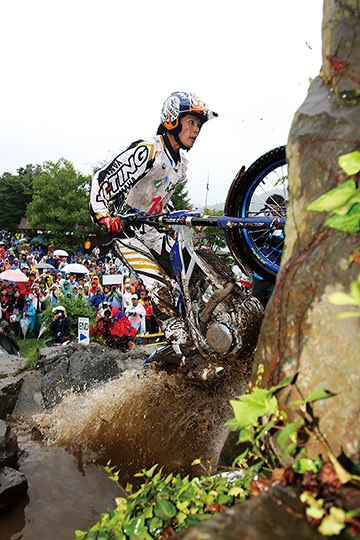
EOS-1D Mark IV/ EF24-105mm f/4L IS USM/ Aperture-priority AE (1/800 sec., f/4.5, -0.3EV)/ ISO 400/ WB: Auto/ Speedlite 580EX II (E-TTL, exposure compensation: -0.3EV, High-speed Sync)
Photos by: Takahito Mizutani
The sky was slightly overcast with drastic changes in the exposure. Under direct sunlight, a harsh shadow was cast on the rider, causing the face to turn out dark in the photo taken at the standard exposure. When the sun was obscured by the clouds, the result was a photo with little impact and a low contrast. To resolve these issues, I made use of a flash.
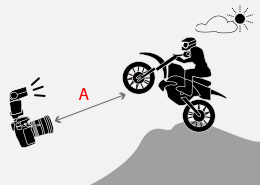
A: Approx. 4m
I used a flash to reproduce the vivid yellow of the swallowtail butterfly that was attracted to a zinnia. The butterfly would turn out blurry at a shutter speed that the flash was capable of synchronising with, so I made use of high-speed sync. The exposure mode of the camera was set to Manual, and the shutter speed and aperture value were set to 1/800 second and f/11 respectively. When applying high-speed sync on a moving subject, you are recommended to set the background to a slightly decreased exposure.
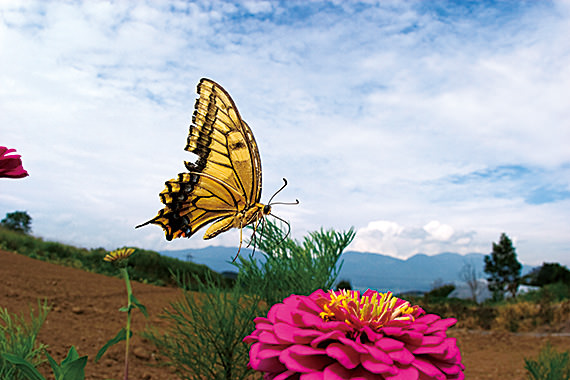
EOS 10D/ EF15mm f/2.8 Fisheye/ Aperture-priority AE (1/800 sec., f/11)/ ISO 200/ WB: Daylight/ Speedlite 550EX (E-TTL, High-speed Sync)
Photos by: Kazuo Unno
A swallowtail butterfly flitting from flower to flower in search of nectar. On a slightly overcast day, photographing with only the sunlight would cause the butterfly to appear underexposed, and its colours cannot be reproduced as desired. I wanted to fire the flash to resolve this issue, but selecting the fastest shutter speed supported by the normal flash would cause the subject to turn out blurry.
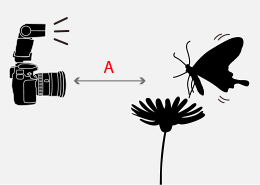
A: Approx. 0.15m
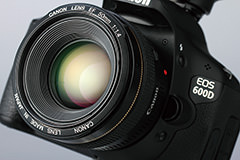
Choose a lens with a bright maximum aperture if you want to make use of the large bokeh in your photo.
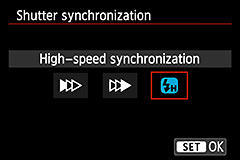
Press the High-speed sync/Shutter curtain synchronisation button. To make use of high-speed sync, simply press this button on the flash unit. For flash units that do not come with this button, select [Flash control] in the camera menu, and change the synchronisation settings for the external flash.
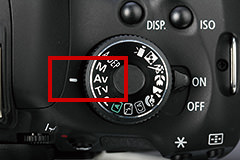
Turn the Mode Dial on the camera to select a shooting mode. Select Tv if your emphasis is on the shutter speed, and Av if you want to create bokeh effect.
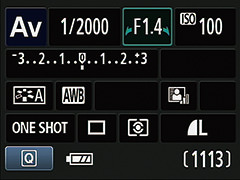
Set the shutter speed and aperture value according to the intended expression.

Born in Hiroshima in 1982, Ueda started his career as an assistant for photographer Shinichi Hanawa. He later became a freelance photographer, and is now engaged in a wide range of work from magazines to commercials while shooting different cities and landscapes all around the world. He is also a writer and a lecturer at photography lectures and workshops.

Join the Conversation