EOS R6 Mark III vs. EOS C50 (2): Shooting Capabilities and Workflows

Advanced

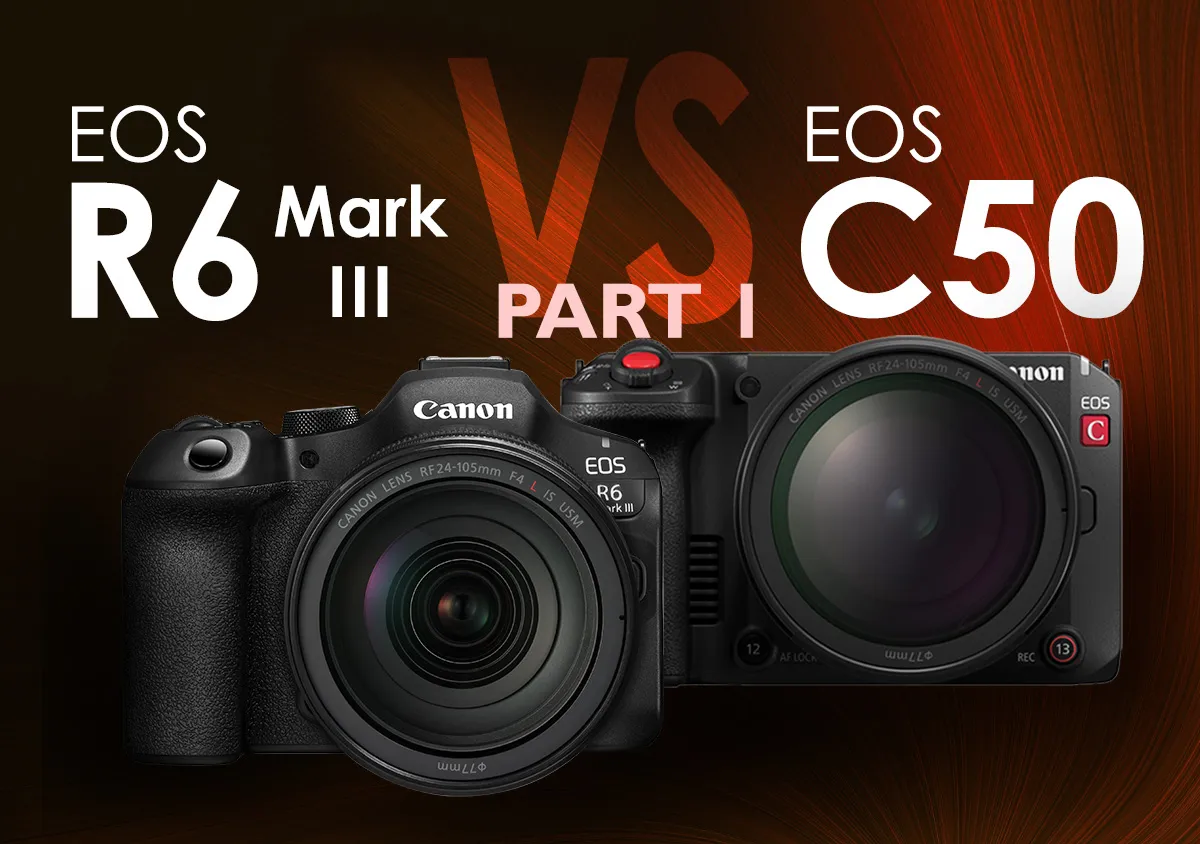
The EOS R6 Mark III and EOS C50 are both powerful photo-video hybrid cameras that seem to share many similar features on the surface. However, digging deeper uncovers differences that reflect how they cater to different workflows and usage styles. In this 2-part series, we explore these differences and the implications. Here in Part 2, we explore the differences in software-driven implementations such as autofocus, recording formats, and supported applications.

Snapshot

Published on 16 February 2026 Updated on 13 March 2026

Reading Time 10 minutes

  • 2
  • 0
  • 0

Click here for Part 1, where we compared the cameras’ design, interfaces, and physical mechanisms.

1. RAW video possibilities

File efficiency and compression options

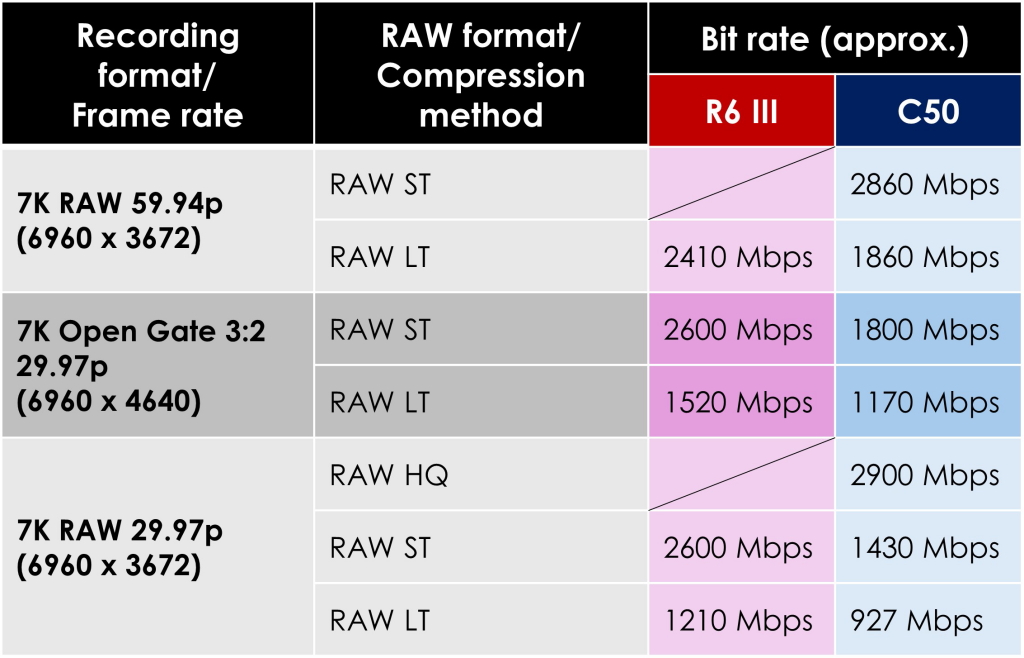
On the surface, both cameras seem to have the same RAW recording capabilities: 7K RAW up to 60p, and Open Gate Full-frame 3:2 7K RAW up to 30p. Both record RAW videos with the “*.crm” container. However, the EOS C50 records in the more efficient Cinema RAW Light format, which produces smaller file sizes than the EOS R6 Mark III’s RAW format while retaining the same information. This is reflected in their video bit rates: some examples in the table below.

As the table above also shows, the EOS C50 provides more RAW compression options, such as high quality RAW (RAW HQ) for 7K DCI 30p recording.

External RAW recording
The EOS R6 Mark III supports up to 7K 30p/cropped 4.3K 60p RAW external recording, whereas the EOS C50 supports up to 4K 10-bit 4:2:2 external recording.

Cropped RAW recording
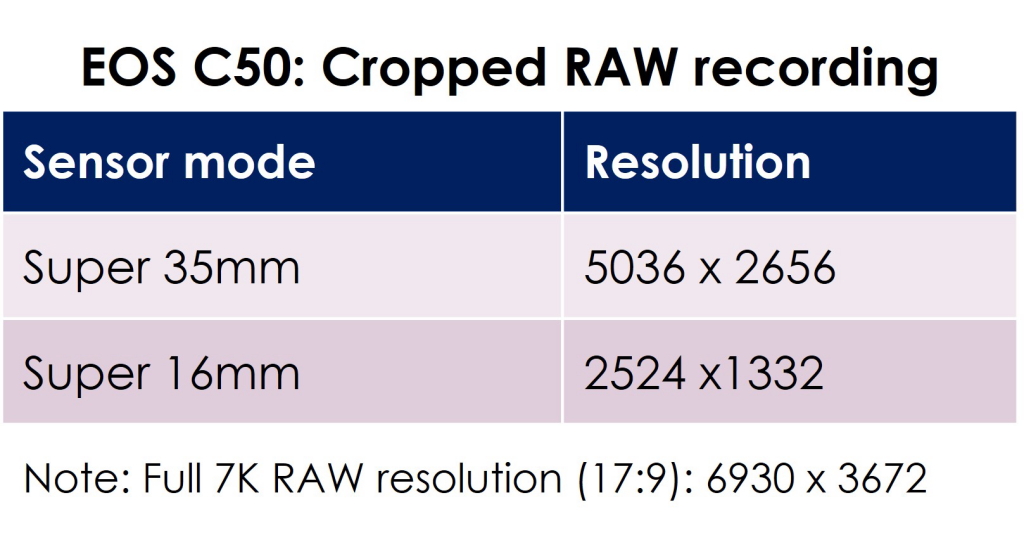
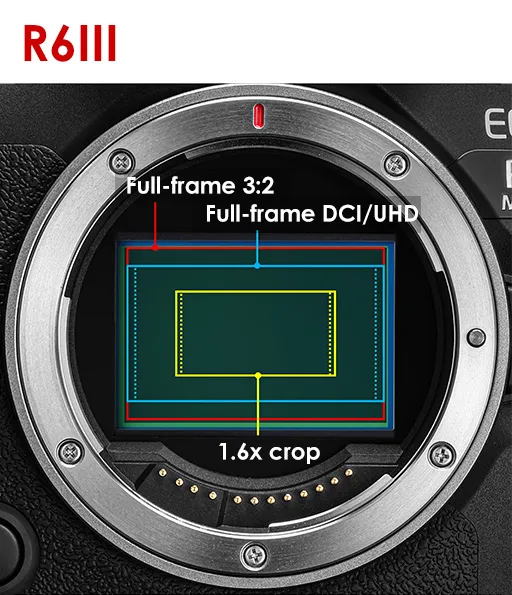
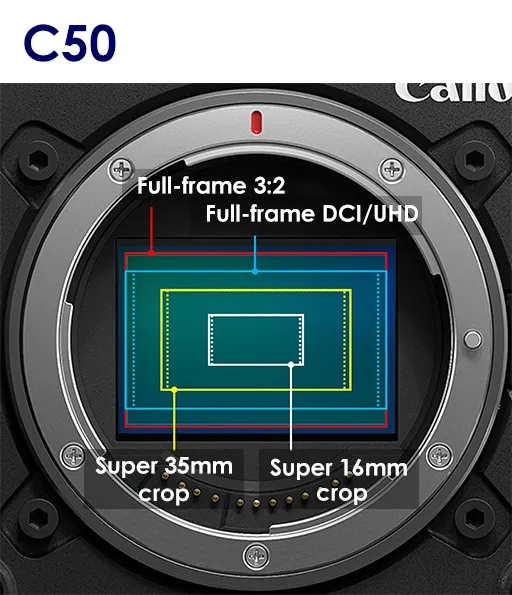
On the EOS C50, you can record cropped RAW video in the Super 35mm (crop) and Super 16mm (crop) modes.  The EOS R6 Mark III allows cropped recording only in 4K, 2K, and Full HD modes.

EOS C50 cropped recording formats


2. Autofocus

Subject detection capabilities
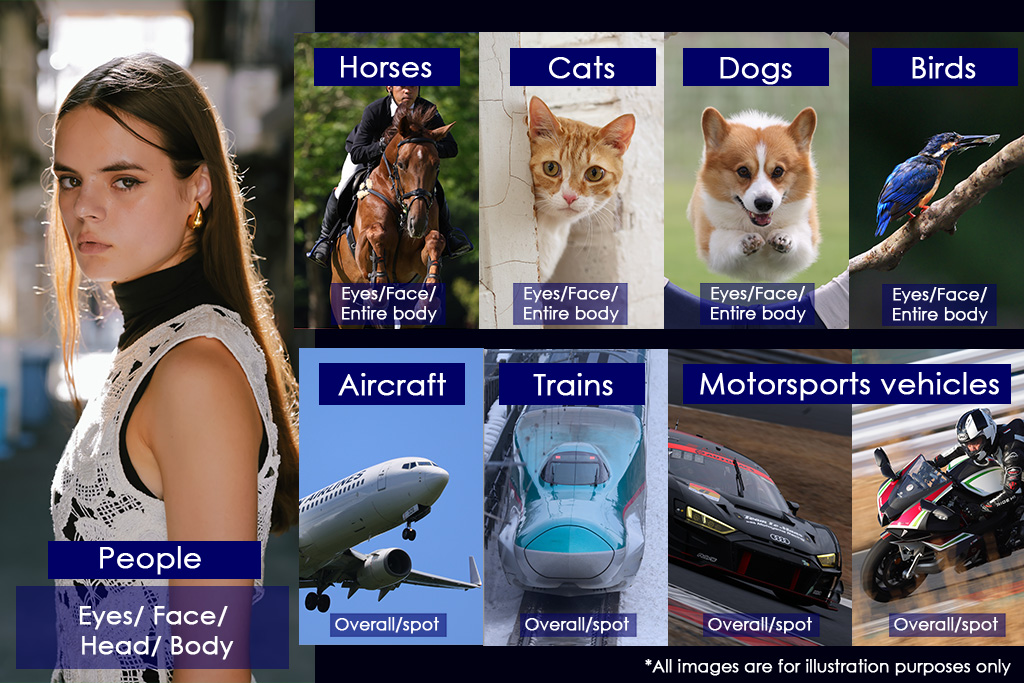
Subjects detectable by the EOS R6 Mark III and EOS C50 in Photo mode.

The EOS R6 Mark III keeps the same subject detection capabilities across Photo and Video modes. The EOS C50 shares them in Photo mode, but not in Video mode. Subject detection capabilities are as shown below.
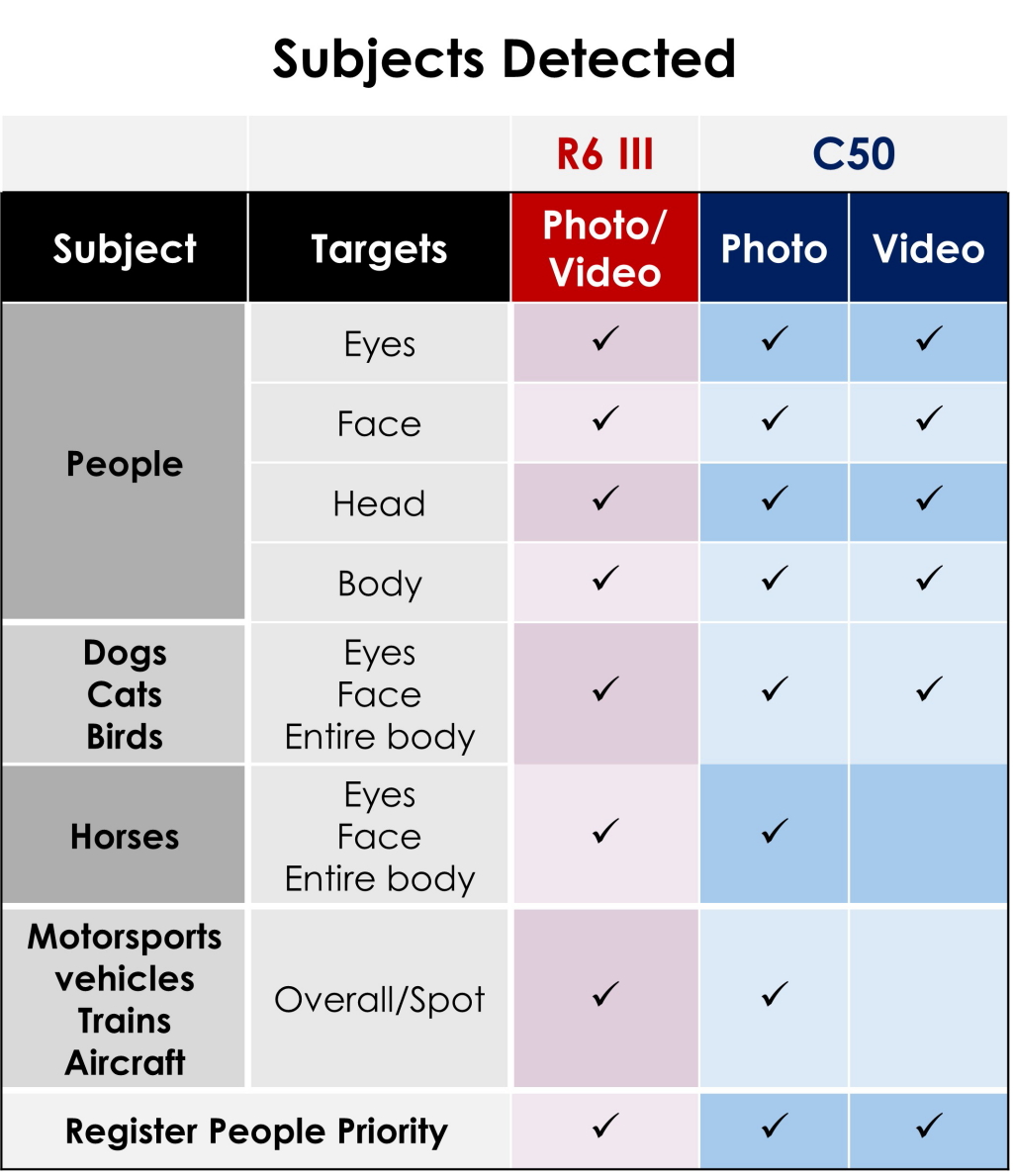
Both the EOS R6 Mark III and EOS C50 feature the Register People Priority mode, which prioritises pre-registered people for autofocusing and tracking when shooting stills and video.

AF during slow/fast motion recording
Both cameras are capable of swift and reliable AF even during slow/fast motion recording. However, the EOS C50 supports autofocus only when shooting at 150 fps and below.

AF/MF assist features
The EOS R6 Mark III is equipped with some Movie Servo AF features previously exclusive to the Cinema EOS system. This includes:

  • Detection-only AF mode: Prevents focus hunting when the subject moves out of the composition.
  • Subject switching through focus ring operation: Allows using manual focus override to switch tracked subjects.
  • The same focus acceleration/deceleration algorithm found on the EOS C400 cinema camera: Focus transitions that look more organic.

Both cameras also feature manual focus aids such as peaking, the Manual Focus Guide, and the ability to magnify the view during movie recording. These give them nearly the same control and focus assist functions for single operator shoots.


AF for Close Up Demos mode
The EOS R6 Mark III additionally features the “AF for Close-up Demos” mode, a Special Scene mode that prioritises the subject closest to the camera. This provides vloggers and livestreamers with a convenient way to leave the focusing to the camera when giving product reviews or live demonstrations, even when streaming over a USB connection.

 

3. Simultaneous recording

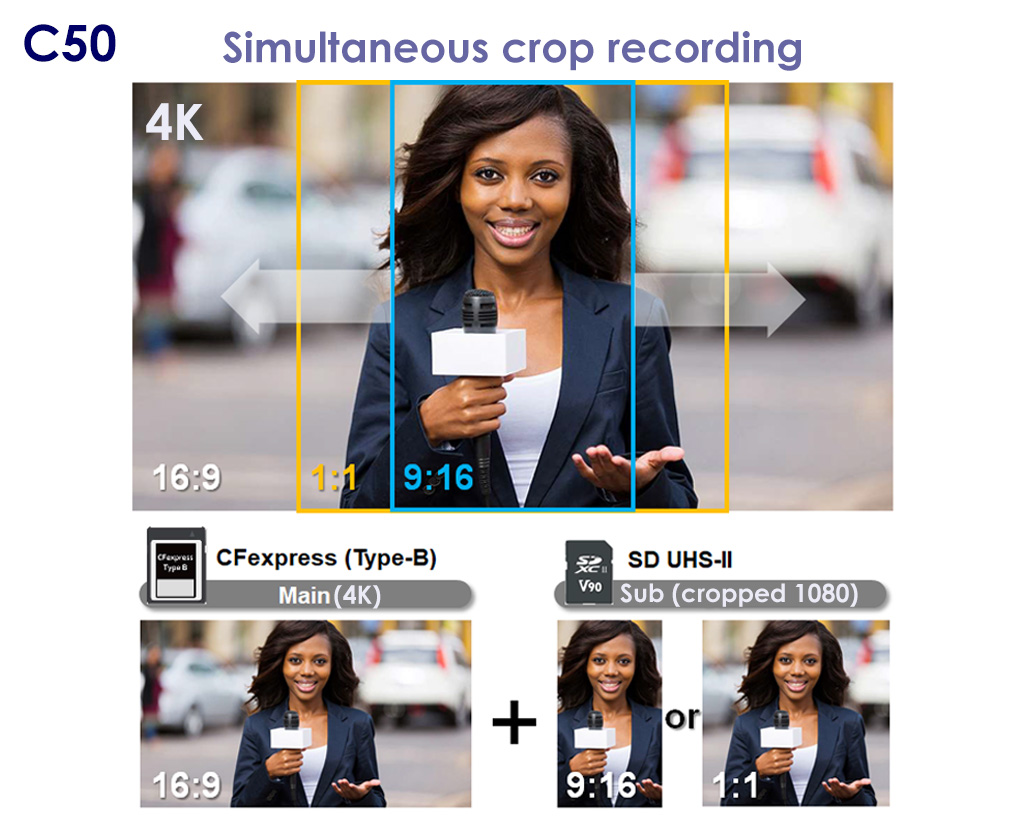
The EOS R6 Mark III and EOS C50 both support simultaneous recording, allowing lower resolution proxies or sub movies to be recorded to the SD card while the main movie is recorded to the CFexpress Type B card.

However, the EOS C50 provides more support for fast turnaround multi-aspect ratio deliveries with simultaneous cropped recording, which records a 9:16 or 1:1 cropped sub file to the SD card at the same time as a 4K 16:9 main file. Users can shift the 9:16 recording frame horizontally, catering to main file compositions where the subject is not in the middle of the frame.


4. Livestreaming/vlogging

EOS R6 Mark III: Convenient functions

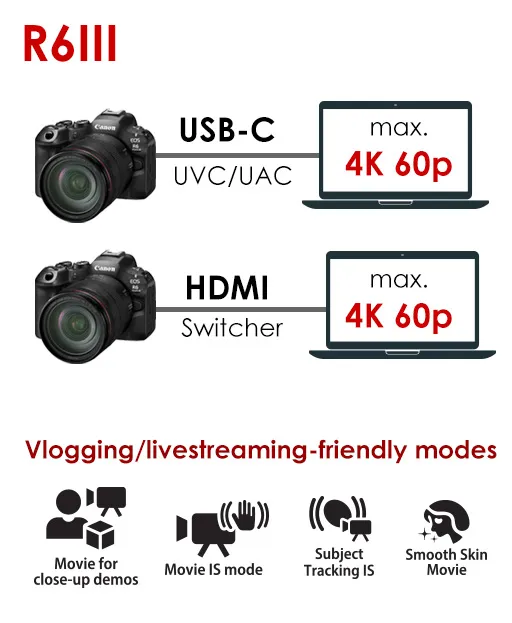
The EOS R6 Mark III has functions that help create better vlogs and livestreams without complex camera settings, such as:

  • Movie for close-up demos mode: Prioritises subjects near the camera**.
  • Movie IS mode: Easy stabilised movies
  • Subject Tracking IS mode**: Detects and maintains the subject position in the frame while performing digital stabilisation.
  • Smooth Skin Movie mode*: Softens skin texture

Meanwhile, the EOS C50’s front REC button makes it easy for users filming themselves to start/stop recording.

*Not available during 4K 60p livestreaming.
**No AF points are displayed. Subjects cannot be selected manually.

USB-C/HDMI livestreaming
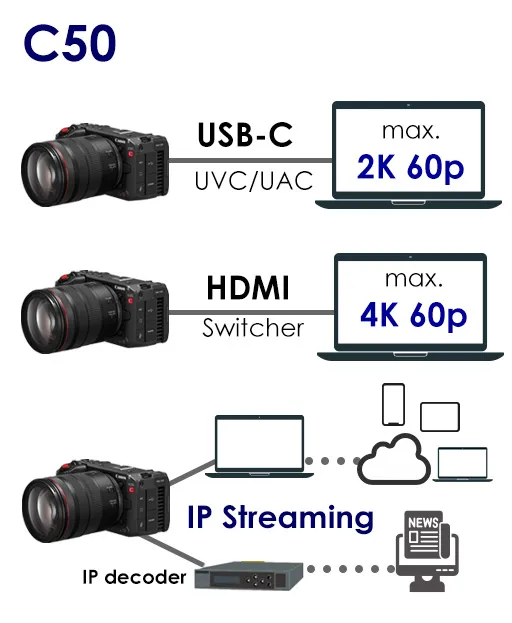
Both cameras support UAC/UVC, and can be used as plug-and-play webcams with a single USB-C or HDMI cable connection. However, supported resolutions and functionalities differ, as below:

UVC/UAC streaming

 R6IIIC50
Max resolution4K 60p4K 60p
Internal video recordingNoYes
(Only when audio output is off)
Option to draw power from computer?Yes
(Only during Full HD livestreaming)
No


HDMI streaming

 R6IIIC50
Max resolution4K 60p4K60p
Simultaneous internal video recordingNo 
(But card must be in the camera)
Yes


Secure IP streaming: EOS C50
The EOS C50 supports SRT for secure, reliable IP streaming of Full HD video up to 59.94p over Wi-Fi or Ethernet* via an IP decoder. This makes it well suited for transmitting news reports or live events over unstable connections or public networks. It simultaneously records the video internally in 4K UHD or Full HD at 59.94p/i or 50.00p/i in XF-AVC S (.mp4) or XF-AVC (.mxf). 


5. Automatic modes and convenient features

The EOS R6 Mark III has several automatic and semi-automatic modes that allow users to easily create their desired photos and videos without diving into technical settings.  These include:

  • Scene Intelligent Auto mode
  • Special Scene modes
  • Automatic and semi-automatic exposure modes for video (Movie P, Tv, and Av)
  • S & F movie mode on the mode dial
  • Color filters mode
  • HDR movie mode

The EOS C50 has most of the same modes in Photo mode. However, it has no fully automatic video shooting modes, and more menu operation is required to set semi-automatic exposure modes.
 

Color filters

In Video mode, only the EOS R6 Mark III offers the “Color filters” color mode, allowing users to easily capture footage that appears colour graded. However, both EOS R6 Mark III and EOS C50 users can download the same “filters” as Look files (3D LUTs) from Canon’s LUT library and register them as custom user LUTs under Custom Pictures. This also gives them more control over the Look’s picture parameters.

The 14 Color Filters are available in Photo mode on both cameras. You can access them by pressing the COLOR button.

BT.709 Wide DR gamma
While both cameras have nearly the same gammas and colour spaces, only the EOS C50 supports BT.709 Wide DR, a gamma that captures a wider dynamic range than standard BT.709 while producing usable colours without colour grading.

6. Workflows and connectivity

What’s shared?
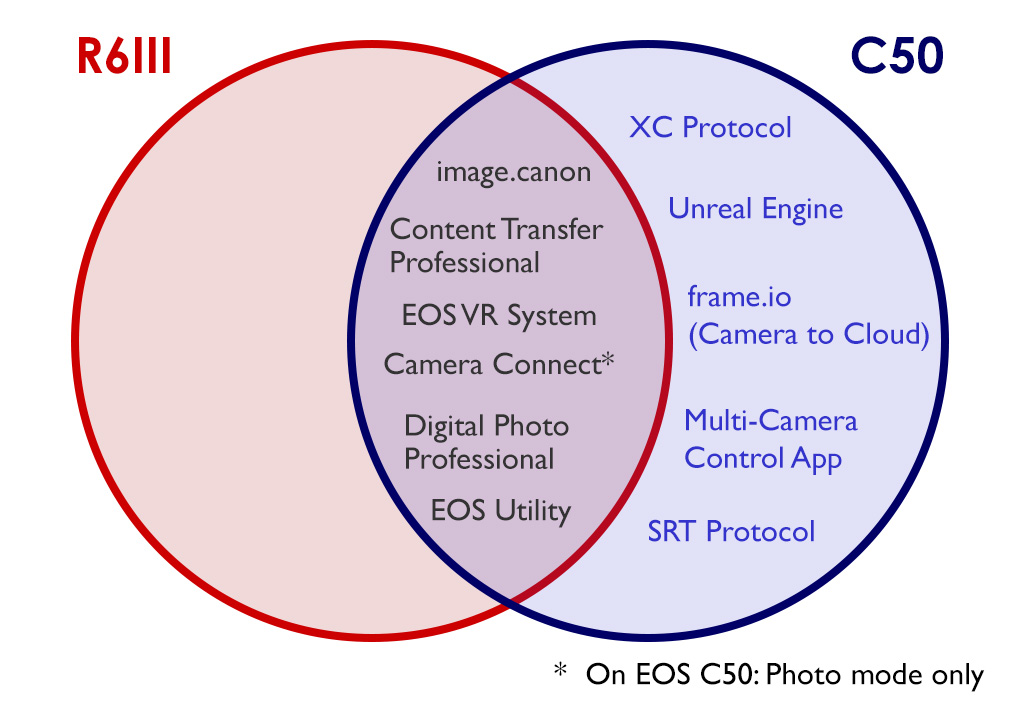
Both cameras support streamlined VR content production workflows via the EOS VR system, as well as high-speed, secure video and photo file sharing via the paid Content Transfer Professional smartphone app.  Both cameras can also upload photo and video files to the image.canon cloud service, which offers additional functions such as automatic transfer to cloud services like Google Drive, Lightroom, and Frame.io.

In Photo mode, the EOS C50 supports the same applications as the EOS R6 Mark III, which include:

  • File transfer and remote shooting via the Camera Connect smartphone app
  • Tethered shooting and file transfer via EOS Utility
     

Advanced workflows and protocols
The EOS C50 additionally supports the following applications and protocols, which are part of professional video production workflows.

  • XC protocol (remote multi-camera control)
  • Unreal Engine (virtual productions)
  • Canon Multi-Camera Control app
  • IP streaming
  • Direct camera-to-cloud upload to Frame.io

It also records in the broadcast standard *.mxf container using the XF-AVC codec.

7. In-camera zooming/cropping capabilities

Both cameras have cropped shooting and digital zooming modes that help you achieve a closer shot beyond what your lens usually allows. However, they are implemented differently, with the EOS C50 offering more control and flexibility.

 R6 IIIC50
Cropped sensor modes

approx. 1.6x crop


Applicable to: 
4K/2K/Full HD recording1

How: Enable “Movie cropping”.


Super 35mm crop
Super 16mm crop

Applicable to: RAW/4K/2K/Full HD recording

How: Change the “Sensor mode” setting

Digital zoom

Up to 10x2

Zoom speed not configurable

AF point is fixed in the centre.

Up to 4x3,4

Configure 2 levels of zoom speed, with 16 stops of settings each

Digital teleconverter

2.0x/ 4.0x3

Available only in Photo mode

1.5x/ 2.0x/ 2.5x/ 3.0x3,4

1 Angle of view varies slightly depending on recording resolution. More information here.
2 Only available when recording in Full HD 29.97p/23.98p/25.00p. Not available when Color mode is set to “Custom Picture”.
3 Not available during RAW recording
4 Not available when VR lens is attached.

8. Monitoring tools

Both the EOS R6 Mark III and the EOS C50 offer monitoring tools that help achieve technically correct footage even without an external monitor.

The EOS R6 Mark III features basic monitoring aids to ensure technical precision on set, including features that help users check and achieve precise exposure:

  • False colours
  • Zebras
  • Waveform monitor (Line/RGB)

The EOS C50 takes this further, providing more tools and customisation options such as:

  • More waveform types: Line/Line + Spot/ Select Line/YPbPr/RGB
  • Waveform opacity settings
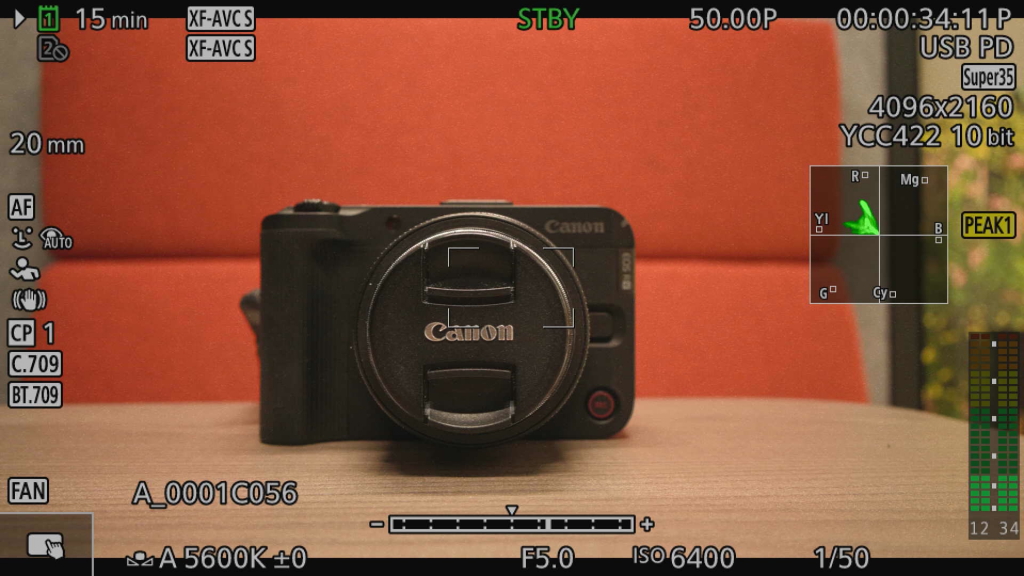
  • Vectorscope
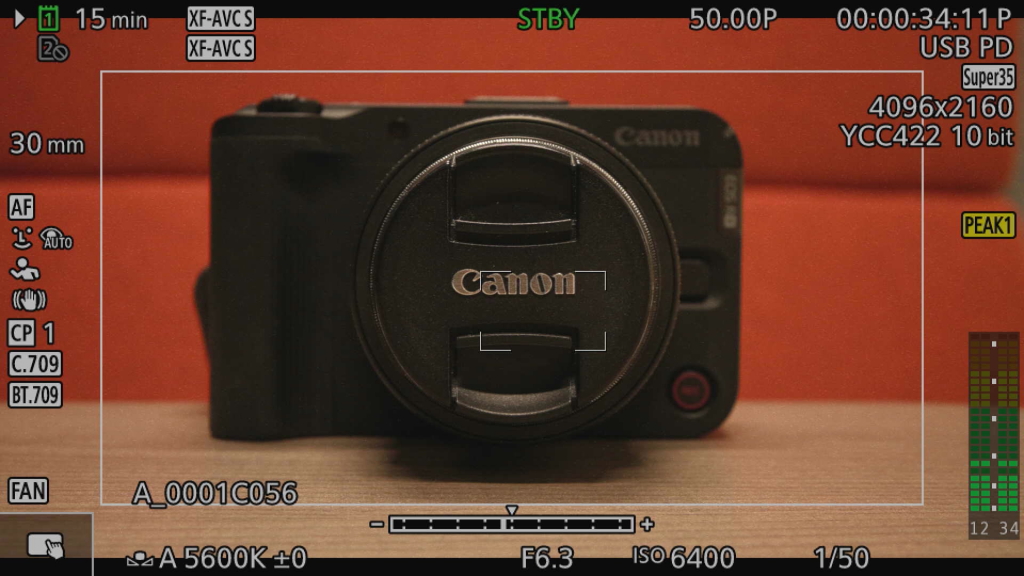
  • Safe area markers
  • Anamorphic desqueeze (2x/1.8x/1.5x/1.3x)

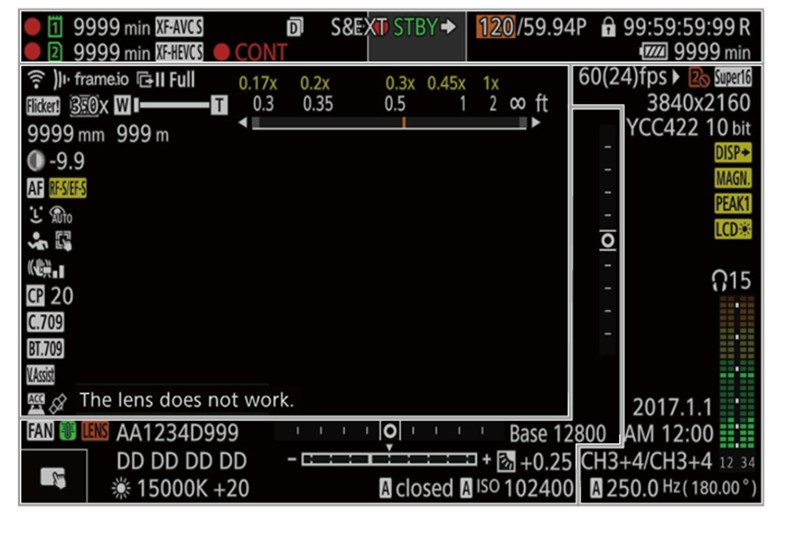
It is also capable of displaying much more information onscreen—useful for verifying settings on set.


Examples of monitoring tools on the EOS C50


Vectorscope display


Safe area markers


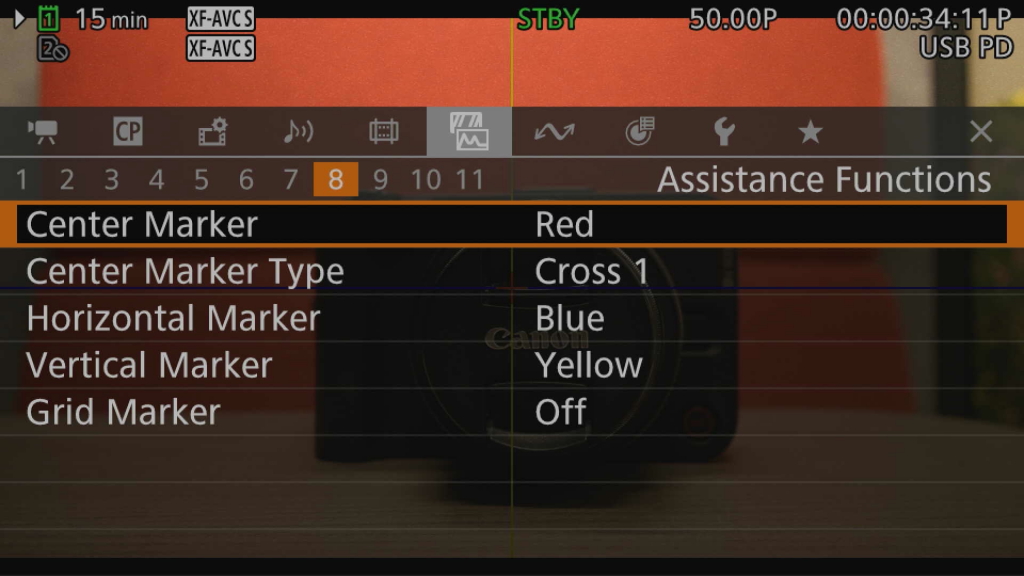
 Monitoring assistance functions are grouped under the Assistance Functions menu tab for easy access. 

9. Slow and fast motion

The cameras share the same slow/fast motion recording capabilities: 1 fps fast motion, slow motion at up to 4K 120 fps or 2K/Full HD 180 fps. However, they are implemented differently.

On the EOS R6 Mark III, there are two ways you can record slow motion video.

EOS R6 Mark III: Ways to record slow motion video 

 Method 1:
Set higher frame rate
Method 2:
Use S&F mode
Shooting frame rateAs specified
(Fast motion recording is not possible)
As specified
Playback speedNormalSlow/fast motion (depending on the shooting frame rate you set)
How to get slow/fast motionPost-productionReady to use out of camera
Audio recorded?Yes, with the clip (if enabled)No


The EOS C50 only has a Slow & Fast Motion Recording mode that resembles the EOS R6 Mark III’s S&F mode. It records audio to the SD card as a separate .wav file.

10. White balance

The EOS R6 Mark III and EOS C50 share features that allow seamless white balance transitions when shooting video, regardless of whether you are using Auto White Balance (AWB) or changing the white balance manually. They also allow users to lock current white balance settings when using AWB.

However, the cameras provide different options for adjusting white balance settings.

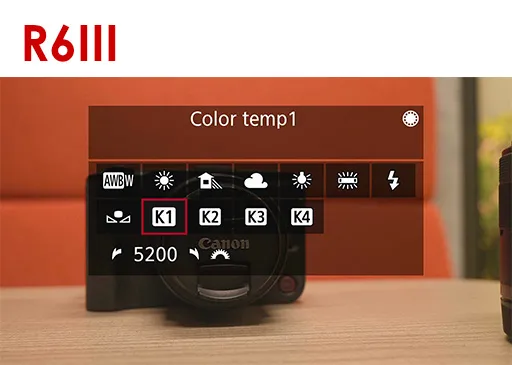
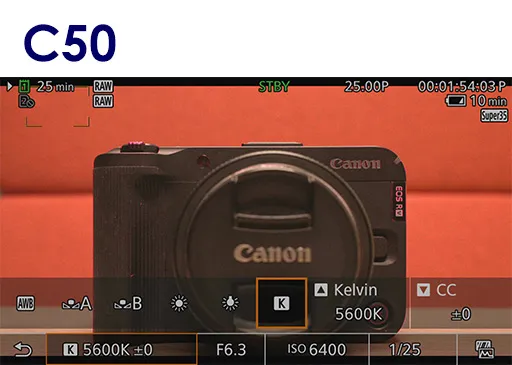
The EOS C50 has one slot for setting the colour temperature in Kelvins, whereas the EOS R6 Mark III has four, allowing them to be used like presets. However, the EOS C50 has two Custom White Balance slots, whereas the EOS R6 Mark III has just one. The Custom White Balance function lets you set the white balance by photographing a white object or grey card, ensuring more accurate white balance matching—important when multiple camera models are used on the same set.

11. Still shooting

As noted in Part 1’s introduction and elsewhere in both Part 1 and Part 2, the EOS R6 Mark III and EOS C50 share essentially the same still shooting capabilities, including:

  •  Pre-continuous shooting
  • Up to 40 fps high-speed continuous shooting
  • Subject detection and tracking
  • Recording resolutions, file formats, and aspect ratios

 Some notable differences:

  • The EOS C50 shoots solely in electronic shutter mode.
  • Flash photography, Bulb mode shooting, and HDR (Moving subjects) mode are available only on the EOS R6 Mark III.


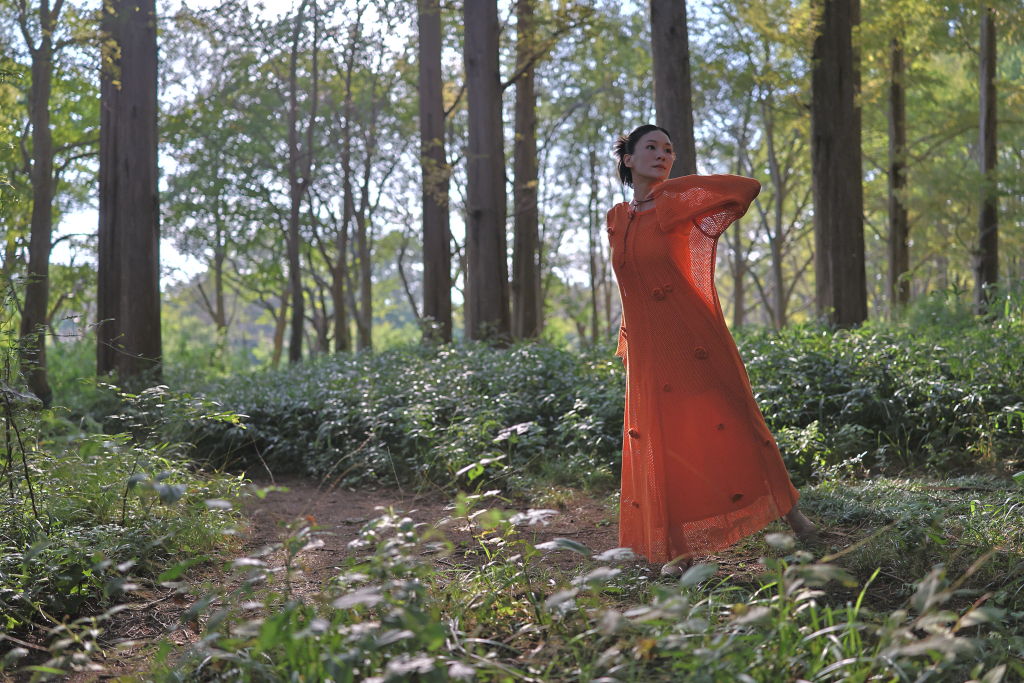
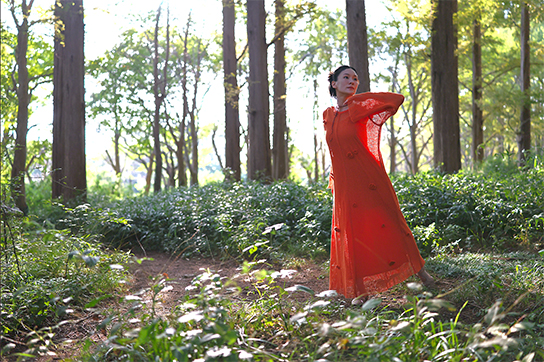
HDR (Moving subjects) mode

EOS R6 Mark III/ RF35mm f/1.4L VCM/ FL: 35mm/ Aperture-priority AE (f/1.8, 1/4000 sec)/ ISO 800/ HDR (Moving Subjects)/
Converted from HEIF to HDR PQ-like JPEG file using Digital Photo Professional 
 

Without HDR

Both the EOS R6 Mark III and EOS C50 can record HDR PQ HEIF still images. Both also have the HDR Mode, which shoots and blends 3 exposure-bracketed images to achieve a single JPEG or HEIF image with a higher dynamic range. 

12. Cinema camera functionalities

The EOS R6 Mark III includes many video-centric capabilities that were previously only available on Cinema EOS cameras like the EOS C50. Besides improving shooting efficiency and creative possibilities, they also allow the EOS R6 Mark III to be easily integrated into Cinema EOS workflows.

However, a professional cinema camera, the EOS C50 has many more advanced video-centric features that streamline workflows and provide more precise control on set. Some have been mentioned in Part 1 and elsewhere in this article. They include:

  • Better support for multi-camera shoots (Time Code terminal, connectivity protocols)
  • Built-in fan and active heat management
  • Features supporting professional audio (XLR terminals and controls in handle unit)
  • Better support for anamorphic, PL-mount, and power zoom/Cine Servo lenses
  • More monitoring tools

Other filmmaking-centric features include the option to control shutter speed in terms of shutter angle, which removes the need to adjust the shutter speed each time you change the frame rate.


Conclusion: Which camera is for me?

If you are torn between the EOS R6 Mark III and EOS C50, the following two questions will give better clarity about which to pick.

  • What kind of projects do you need the camera to be capable of handling?
  • How does the camera fit into your setup/workflow?

Both cameras are well-equipped to cater to advanced single-operator content creation workflows, be it event and documentary coverage, cinematic narratives, corporate videos, or even VR content. So what do you need your camera to do beyond that?

The EOS C50’s versatility and advanced filmmaking features not only open the doors to more creative possibilities, they also equip you to handle complex projects and the diverse demands of client work where setups and delivery requirements can vary vastly day to day. It can be your A camera for a corporate video or run-and-gun documentary shoot one day and integrate seamlessly into a larger production as a B or C camera the next.

The EOS R6 Mark III’s powerful still photography-focused features make it an asset not just for stills-centric workflows, but also filmmakers, creators, and production companies looking to strengthen their stills imaging capacity.


Which camera would you choose? Tell us more in the comments!
 

You May Also Like

EOS R6 Mark III: The Power to Unleash Your Passion

Intermediate

6 November 2025

  • 2 views
  • 0 like

EOS R6 Mark III vs. EOS C50 (1): Body, Handling, and Interfaces

Advanced

16 February 2026

  • 1 views
  • 0 like

EOS C50: Open a World of Cinematic Possibilities

Intermediate

22 October 2025

  • 2 views
  • 0 like
BeginnerExpertIntermediate

EOS R6 Mark III


32.5MP of full-frame hybrid power

Author

Snapshot

Join the Conversation

0 Comments