Capturing Fast-moving Animals with the Live View Function of EOS 70D
Beginner
The greatest charm of the EOS 70D is the enhanced speed of the Live View

- 0
- 0
- 0
The greatest charm of the EOS 70D is the enhanced speed of the Live View
The greatest charm of the EOS 70D is the enhanced speed of the Live View function by the Dual Pixel CMOS AF. In the following, I will provide tips on capturing small, fast-moving animals using this feature. (Reported by: Ryosuke Takahashi; in cooperation with: Chiba Zoological Park)
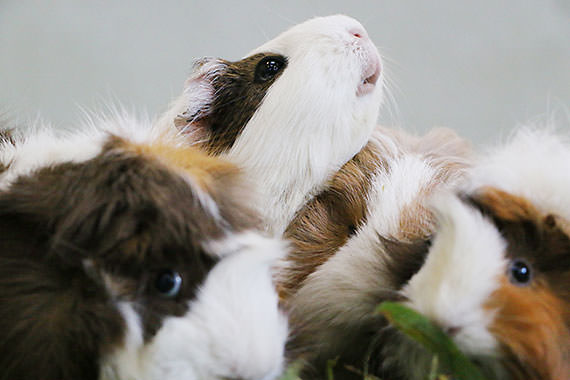
The key to producing lovely photos of little animals lies in how you capture their expressions with the camera angle lowered to their eye level. In the past, Live View shooting was said to be unsuitable for photographing small animals due to the slow AF speed. However, with the Live View function on the EOS 70D, this is comparable to the AF speed during viewfinder shooting. Coupled with a Vari-angle LCD monitor that is useful for low-angle shots, the EOS 70D is said to be the best DSLR camera today for capturing tiny animals. For these subjects, it is important to distinguish the use of the different AF methods, and choose one that matches best with the movement of the subject. Small animals tend to move around than to remain still, so focusing is always a great challenge.
In viewfinder shooting, the common style is to combine FlexiZone - Single with One-Shot AF or AI Servo AF. However, doing so makes it difficult to select the most appropriate AF point instantly, hence missing the decisive moment. On the EOS 70D, I selected the "Face + Tracking" AF method for the Live View function, and tapped the LCD monitor panel for the face of the subject to be detected so that AF tracking on the face will be activated. By doing so, I would be able to capture unexpected moments. With Continuous AF set to [Enable] (default setting), focus will be maintained on the subject, a function that is effectively the same as AI Servo AF. Not only so, if the subject is stationary, using FlexiZone - Single enables focus to be maintained on it almost throughout the entire image, allowing for even more precise and easy focusing compared to the viewfinder.
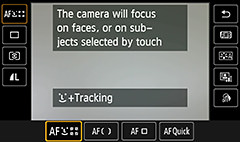
Advantage: Automatic tracking on areas besides the face of the subject is also possible
Disadvantage: The AF point may lose track of the subject in some cases
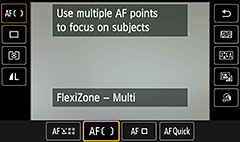
Advantage: Captures decisive moments as focus point is automatically detected
Disadvantage: Focus falls on the closest object due to the proximity algorithm
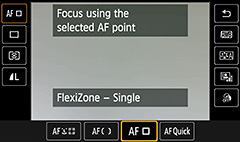
Advantage: Focus is established on a spot even when there is more than one subject
Disadvantage: Not suited for moving objects as it does not have a tracking function

EF-S18-135mm f/3.5-5.6 IS STM/ FL: 64mm/ Aperture-priority AE (1/500 sec., f/5)/ ISO 3200/ WB: Auto
Domestic guinea pigs are also known by the name of marmots. The three guinea pigs were sitting side by side when I was setting the focus, but the Face + Tracking AF successfully captured the moment when the center member lifted its face. As the AF point performs tracking automatically, I was able to produce this natural shot without having to change the composition. The area around the eyes of the subject was sharply captured by the AF point.
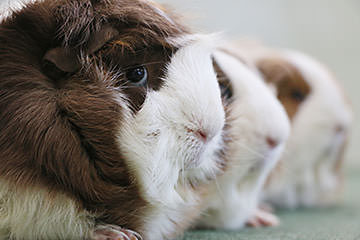
EF-S18-135mm f/3.5-5.6 IS STM/ FL: 62mm/ Aperture-priority AE (1/320 sec., f/5, -0.3EV)/ ISO 1600/ WB: Auto
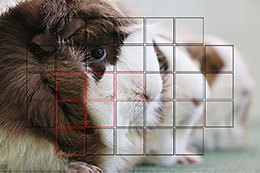
The [FlexiZone - Multi] AF method captures the subject with one or multiple AF points. A special algorithim is employed, which sets focus on the object closest to the camera. Not suited for photographing small animals.
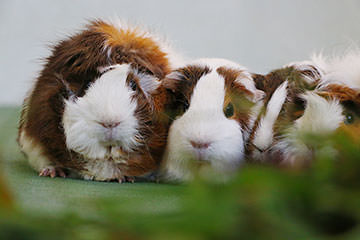
EF-S18-135mm f/3.5-5.6 IS STM/ FL: 62mm/ Aperture-priority AE (1/500sec., f/5, -0.3EV)/ ISO 1600/ WB: Auto
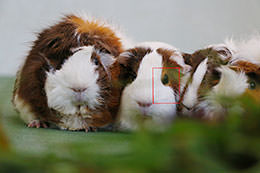
The [FlexiZone - Single] AF method detects the focus within the area of the selected AF point. Suited for scenes that contain both nearby and distant objects. It is similar to the [Single-point AF] mode for viewfinder shooting.
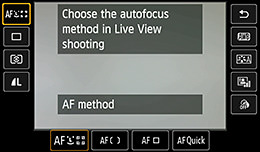
Select AF method from the menu screen or Quick Control screen, and select [Face + Tracking].
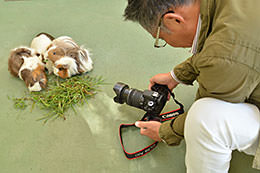
Position the camera close to the ground surface where the face of the subject is visible. Adjust the rear LCD monitor to an angle that allows easy viewing.
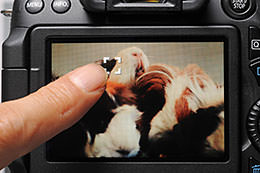
Touch the screen of the rear LCD monitor at the point you want to set focus on for the AF point to be displayed and the focus to be detected.

Born in Aichi in 1960, Takahashi started his freelance career in 1987 after working with an advertising photo studio and a publishing house. Photographing for major magazines, he has travelled to many parts of the world from his bases in Japan and China. Takahashi is a member of the Japan Professional Photographers Society (JPS).



Join the Conversation